


Comment utiliser NetAppel avec votre appareil normalisé SIP
Il vous faut un nom d'utilisateur et un mot de passe NetAppel pour appeler par notre réseau. Vous devez donc d'abord. vous inscrire à NetAppel en téléchargeant et en installant le logiciel puis en créant votre connexion.
Afin d'appeler à des prix EXTRA BAS via le réseau NetAppel, veuillez saisir les paramètres suivants:
Vous pouvez utiliser NetAppel avec les types d'appareils Sip suivants :
 |
SIP ATA (adaptateur pour téléphone analogique)
|
 |
Routeur SIP
|
 |
Modem xDSL
|
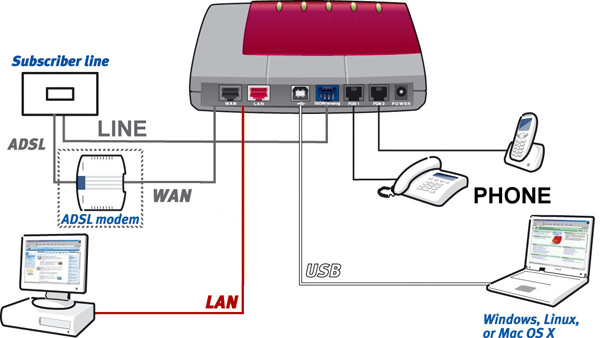
La plupart des appareils sont équipés d'une combinaison des ports suivants.
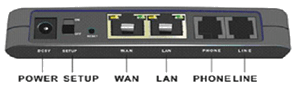
Example 1
(ce n'est qu'un exemple, les types d'appareil pouvant être différents)
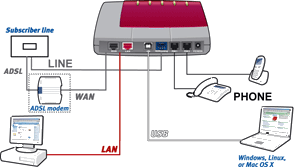
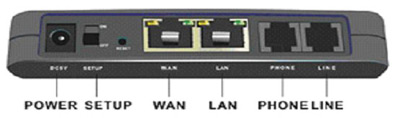
Example 2

(ce n'est qu'un exemple, les types d'appareil pouvant être différents)
 |
(A)DSL: raccorder la ligne de votre fournisseur (A)DSL (non disponible sur un ATA)
|
 |
WAN: raccorder la ligne venant de votre modem/routeur xDSL
|
 |
LAN: port pour votre réseau (à domicile), vous pouvez raccorder par exemple votre ordinateur portable, une imprimante en réseau ou un routeur sans fil
|
 |
PHONE: vous pouvez brancher ici votre téléphone analogique |
 |
LINE: raccorder votre ligne de téléphone analogique (PSTN) |
 |
USB: vous pouvez brancher un ordinateur de bureau ou portable avec un port USB libre |
Pour les connections matérielles depuis votre appareil SIP, voir les informations ci-dessous et le manuel de l'utilisateur.
Après avoir connecté l'appareil, assurez-vous que le logiciel est installé et configuré de façon identique.
Configuration du logiciel
Vous trouverez ci-dessous quelques exemples de configuration logicielle pour les appareils SIP les plus répandus. Veuillez consulter le manuel qui accompagne votre appareil SIP
AVM Fritz!box FON 7050


|
Fill in the following settings:
| |
 |
Internet number: your VOIP phone number (if available) |
 |
User Name: fill in your username, this is the username you used for the registration of your netappel-account |
 |
Password: fill in your password, this is the password you used for the registration of your netappel-account |
 |
Password confirmation: fill in your password, this is the password you used for the registration of your netappel-account |
 |
Registrar: this is sip.netappel.fr |
 |
Proxy server: this is sip.netappel.fr |
 |
Overview - number 1, 2 or 3: your VOIP phone number (if available) |
|
AVM Fritz!box FON ATA 1020

|
Fill in the following settings:
| |
 |
Internet number: you can fill-in e.g. your name or telephone number |
 |
User name: fill in your username, this is the username you used for the registration of your netappel-account |
 |
Password: fill in your password, this is the password you used for the registration of your netappel-account |
 |
Password confirmation: fill in your password again |
 |
Registrar: this is sip.netappel.fr |
 |
STUN-Server: this is stun.netappel.fr |
|
LINKSYS WIP330

|
Fill in the following settings:
| |
 |
SIP Proxy: fill in netappel.fr |
 |
SIP Proxy Port: this is port number 5060 |
 |
Registrar Address: this is sip.netappel.fr |
 |
Registrar Port: this is port number 5060 |
 |
Expiry Time(sec): this is 3600 seconds |
 |
Display name: you can fill-in e.g. your name or telephone number, this name will be displayed in the phone screen of the person you are calling |
 |
Registrar Name: fill in your username, this is the username you used for the registration of your netappel-account |
 |
Registrar Password: fill in your password, this is the password you used for the registration of your netappel-account |
|
LINKSYS SPA3102

|
Fill in the following settings:
| |
 |
Line Enable: Yes |
 |
SIP Port : portnumber 5060 |
 |
Proxy: fill in sip.netappel.fr |
 |
Register: this is 'Yes' |
 |
Make Call Without Reg: fill in 'Yes' |
 |
Register Expires: this is 3600 seconds |
 |
Ans Call Without Reg: fill in 'No' |
 |
Display name: you can fill-in e.g. your name or telephonenumber, this name will be displayed in the phone screen of the person you are calling |
 |
User ID: fill in your username, this is the username you used for the registration of your netappel-account |
 |
Password: fill in your password, this is the password you used for the registration of your netappel-account |
 |
Use Auth ID: set to 'No' |
|
GRANDSTREAM HT286

|
Fill in the following settings:
| |
 |
SIP server : fill in sip.netappel.fr |
 |
Outbound proxy : this is sip.netappel.fr |
 |
SIP User ID : fill in your username, this is the username you used for the registration of your netappel-account |
 |
Authenticate Password : fill in your password, this is the password you used for the registration of your netappel-account |
 |
Name : you can fill-in e.g. your name or telephonenumber, this name will be displayed in the phone screen of the person you are calling |
 |
Don't change the Advanced Options |
|
GRANDSTREAM HT386

|
Fill in the following settings:
| |
 |
SIP Server : fill in sip.netappel.fr |
 |
Outbound Proxy : this is sip.netappel.fr |
 |
SIP User ID : fill in your username, this is the username you used for the registration of your netappel-account |
 |
Authenticate Password : your password, this is the password you used for the registration of your netappel-account |
 |
Name : your name or telephonenumber, this name will be displayed in the phone screen of the person you are calling |
 |
Local SIP port : fill in 5060 |
 |
Don't change the other options |
|
GRANDSTREAM HT486

|
Fill in the following settings:
| |
 |
SIP Server : fill in sip.netappel.fr |
 |
Outbound Proxy : this is sip.netappel.fr |
 |
SIP User ID : fill in your username, this is the username you used for the registration of your netappel-account |
 |
Authenticate Password : fill in your password, this is the password you used for the registration of your netappel-account |
 |
Name : you can fill-in e.g. your name or telephonenumber, this name will be displayed in the phone screen of the person you are calling |
 |
Don't change the Advanced Options |
|
GRANDSTREAM HT496

|
Fill in the following settings:
| |
 |
SIP server : fill in sip.netappel.fr |
 |
Outbound Proxy : this is sip.netappel.fr |
 |
SIP User ID : fill in your username, this is the username you used for the registration of your netappel-account |
 |
Authenticate Password : your password, this is the password you used for the registration of your netappel-account |
 |
Name : your name or telephonenumber, this name will be displayed in the phone screen of the person you are calling |
 |
Local SIP port : fill in 5060 |
 |
Don't change the other options |
|
SIEMENS SX553

|
Fill in the following settings:
| |
 |
Rufnummer : your VOIP phone number (if available) |
 |
Namen anzeigen : you can fill in your name |
 |
SIP-Domäne : fill in sip.netappel.fr |
 |
Bereich : this is netappel.fr |
 |
Benutzername : fill in your username, this is the username you used for the registration of your netappel-account |
 |
Passwort : fill in your password, this is the password you used for the registration of you netappel-account |
 |
SIP Listen-Port : this is port 5060 |
 |
Proxy-IP-Adresse : fill in sip.netappel.fr |
 |
Proxy-Port : this is port 5060 |
 |
Registrar-IP-Adresse : sip.netappel.fr |
 |
Registrar-Port : this is port 5060 |
|
SMC 7908 VoWBRA

|
Fill in the following settings:
| |
 |
Username : fill in your username, this is the username you used for the registration of your netappel-account |
 |
Password : fill in your password, this is the password you used for the registration of your netappel-account |
 |
Phone Number : your VOIP phone number (if available) |
 |
Display Name : you can fill in your name |
 |
SIP Domain : this is netappel.fr |
 |
Realm : fill in netappel.fr |
 |
Proxy IP Address : this is sip.netappel.fr |
 |
Proxy Port : this is port 5060 |
 |
Registrar IP Address : this is netappel.fr |
 |
Registrar Port : this is port 5060 |
|
X-lite v3.0 software

|
Fill in the following settings:
| |
 |
Display Name : your name or telephonenumber, this name will be displayed in the phone screen of the person you are calling |
 |
User name : fill in your username, this is the username you used for the registration of your netappel-account |
 |
Password : your password, this is the password you used for the registration of your netappel-account |
 |
Authorization user name : same as User name |
 |
Domain : fill in sip.netappel.fr |
|
LINKSYS WIP330
| Fill in the following settings:
| |
 |
SIP Proxy: fill in netappel.fr
|
 |
SIP Proxy Port: this is port number 5060
|
 |
Registrar Address: this is sip.netappel.fr
|
 |
Registrar Port: this is port number 5060
|
 |
Expiry Time(sec): this is 3600 seconds
|
 |
Display name: you can fill-in e.g. your name or telephone number, this name will be displayed in the phone screen of the person you are calling
|
 |
Registrar Name: fill in your username, this is the username you used for the registration of your NetAppel-account
|
 |
Registrar Password: fill in your password, this is the password you used for the registration of your NetAppel-account
|
|
LINKSYS SPA3102
| Fill in the following settings:
| |
 |
Line Enable: Yes
|
 |
SIP Port : portnumber 5060
|
 |
Proxy: fill in sip.netappel.fr
|
 |
Register: this is 'Yes'
|
 |
Make Call Without Reg: fill in 'Yes'
|
 |
Register Expires: this is 3600 seconds
|
 |
Ans Call Without Reg: fill in 'No'
|
 |
Display name: you can fill-in e.g. your name or telephonenumber, this name will be displayed in the phone screen of the person you are calling
|
 |
User ID: fill in your username, this is the username you used for the registration of your NetAppel-account
|
 |
Password: fill in your password, this is the password you used for the registration of your NetAppel-account
|
 |
Use Auth ID: set to 'No'
|
|
Si la partie audio pose des problèmes:
Utilisez un serveur STUN (stun.netappel.fr) avec un port 3478 (si supporté par votre appareil). Utilisez le codec G.711. Pour davantage de spécifications techniques, veuillez consulter le FAQ.
* Maximum de 300 minutes par semaine d'appels
gratuits, mesuré sur les 7 derniers jours. Les minutes gratuites non utilisées ne peuvent êtres reportées a la (aux) semaine(s) suivante(s). Si la limite est dépassée, le
tarif normal sera appliqué. Avec vos FREE DAYS vous pouvez appeler gratuitement toutes les destinations listées gratuites ! Quand vous n'avez plu de FREE DAYS, le tarif normal est appliqué. Vous pouvez obtenir de nouveaux FREE DAYS en
achetant du crédit.